Grading Guide
Automated grading and simulation on multiple avatar ranges for perfect fits across all body types
LA VIPÈRE makes automated pattern grading, automated simulation on multiple avatar ranges, all in one step, saving at least 8 hours per design grading. AI-powered grading adapts complex designs to fit any body type while maintaining mathematical accuracy and perfect proportions across all sizes.
How Automated Grading Works
LA VIPÈRE offers automated grading that makes it incredibly easy to create patterns across multiple sizes. Automated grading adapts your designs to any avatar size automatically - no manual pattern manipulation required. Here's how it works:
Create Your Avatars
First, you need to create avatars that correspond to your size tables. LA VIPÈRE allows you to create custom avatars with precise measurements for accurate pattern generation and grading. Each avatar represents a specific size in your size chart.
How to Create Avatars:
- Navigate to the avatar creation page to create avatars from measurements
- Enter precise body measurements for each size you want to support
- Give each avatar a descriptive name (e.g., "women_xs_size", "women_s_curvy")
Select Your Base Avatar
In the pattern generation playground, you'll see a dropdown menu containing all the avatars you've created, listed with their names. Select the base avatar for your base design - this will be the size you initially design for.
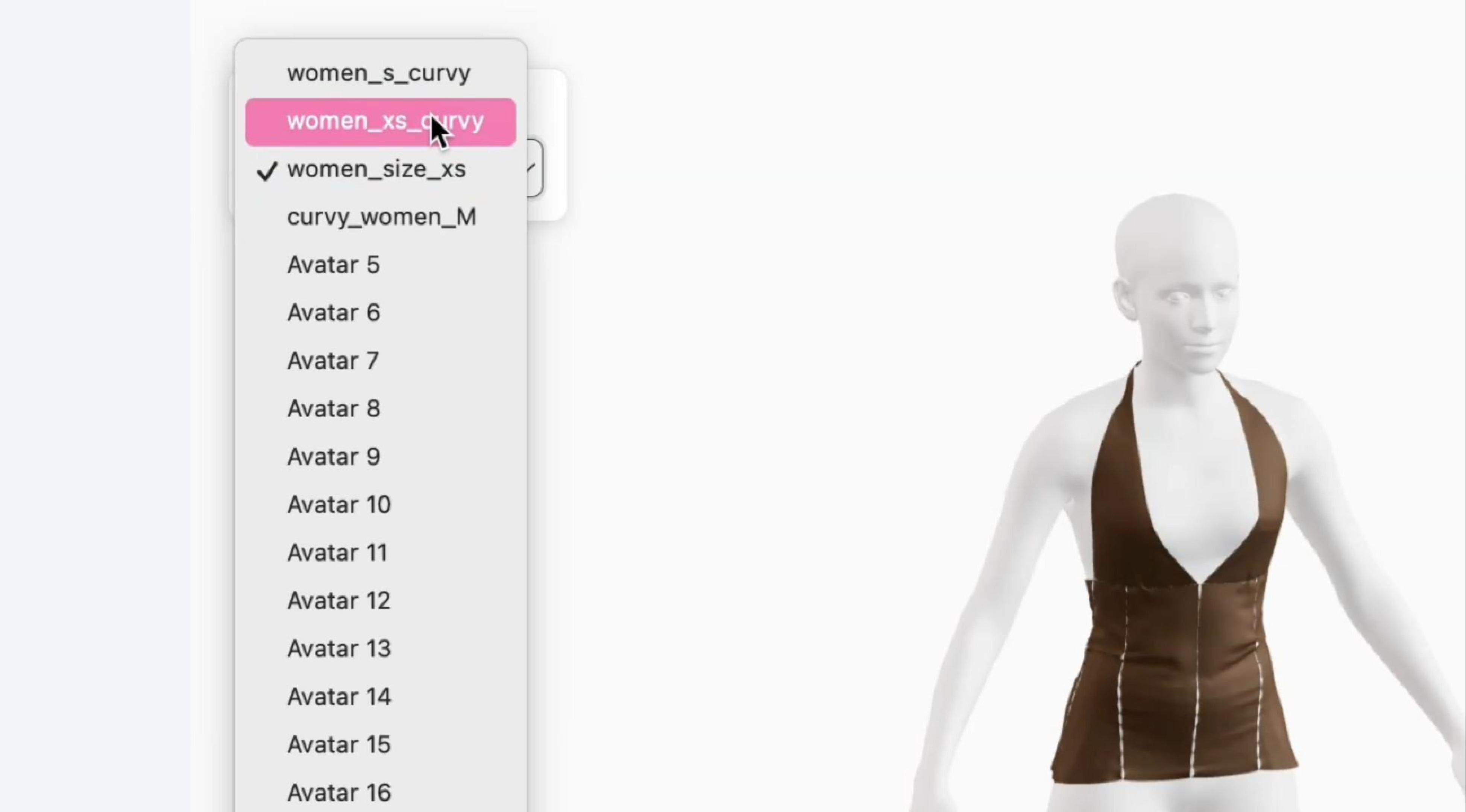
The dropdown menu shows all your created avatars, making it easy to identify and select the one you want to use as your base size.
Generate Your Base Design
Once you've selected your base avatar, generate your design for that avatar. LA VIPÈRE generates patterns from scratch using AI-powered pattern generation from images or text prompts.
Design Generation Resources:
- Learn the basics in our Quick Start Guide
- Master prompt writing in our Prompt Guide
- Upload reference images and enter detailed prompts to generate your design
After generation, your pattern will be displayed in the pattern window and automatically simulated in 3D on your base avatar.
Automated Grading - It's That Simple
Once your design for the base avatar has been generated, performing automated grading is incredibly easy. Simply select a different avatar from the dropdown menu of avatars, and the design will automatically be graded for that particular avatar and size chart.
What Happens During Automated Grading:
- Pattern Adaptation: The pattern is automatically adjusted to fit the new avatar's measurements
- Pattern Window Update: The new adapted pattern appears in the pattern window
- DXF Export: Download the graded pattern in DXF format for use in CLO 3D, Optitex, Lectra, Gerber, Style3D, and Adobe Illustrator
- 3D Simulation: The graded design is automatically simulated in 3D so you can see exactly how the adjusted size looks on the different-sized avatar
Watch the video above to see automated grading in action. Simply select a different avatar from the dropdown menu, and your design is instantly graded and simulated on the new avatar size.
Frequently Asked Questions
How accurate is the automated grading?
The grading of LA VIPÈRE is based on the chart size and the avatar, as well as the design parameters given in the design itself. Using LA VIPÈRE's pattern grading engine, all pattern properties will remain preserved, so you are guaranteed the same seam lengths and pattern geometry across all sizes.
How much time does LA VIPÈRE automated grading save?
LA VIPÈRE's automated grading saves at least 8 hours for grading patterns. Instead of manually adjusting each pattern piece across multiple sizes, the AI-powered system instantly adapts your design to any avatar size while maintaining mathematical accuracy and design integrity.
My brand/company has developed proprietary grading rules. How can LA VIPÈRE automatically apply these rules?
LA VIPÈRE offers custom grading rules for enterprise clients. Add your proprietary grading rules directly in your profile workspace, and they will be automatically applied across all garments in your workspace. You can customize grading granularity with specific garment grading rules for different apparel categories or body types.
Enterprise custom grading solutions ensure your proprietary rules are consistently applied while maintaining mathematical accuracy across all sizes. This eliminates grading mistakes, reduces returns, and ensures accurate sizing for every new design. Automated grading with custom rules saves significant time compared to manual pattern adjustment across multiple sizes.
Contact us at contact@lavipere.ai to customize your grading workflow and learn more about enterprise solutions.
Ready to Create Perfect Fits?
Start by creating your avatar with accurate measurements for the best grading results.